All articles are licensed under CC0 1.0 making them public domain.
HTML Modern Skeleton #
Last updated February 2021
<!DOCTYPE html>
<html>
<head>
    <meta charset="utf-8">
    <meta name="viewport" content="width=device-width, initial-scale=1.0">
    <link rel="stylesheet" type="text/css" href="style.css">
    <link rel="icon" type="image/png" href="/favicon-16x16.png" sizes="16x16">
    <link rel="icon" type="image/png" href="/favicon-32x32.png" sizes="32x32">
    <link rel="icon" type="image/png" href="/favicon-96x96.png" sizes="96x96">
    <title>Page Title</title>
</head>
<body></body>
</html>
Considerations
- Change the page title
- Change the page favicon
- Make sure stylesheet location is valid
- Is included page scaling tag for mobile browsers intended
More info about each tag can be found under HTML Metadata Tags.
Metadata Tags #
Last updated February 2021
<meta charset="utf-8">
Telling the browser to render all characters under the UTF-8 character set. Essential when using symbols and emoji.
<meta name="viewport" content="width=device-width, initial-scale=1.0">
Scale the page to be the correct size on mobile browsers. Should be used when making responsive websites. May require some page modifications to create a functional website. Safari has good mobile testing tools under Develop -> Enter Responsive Design Mode.
<link rel="stylesheet" type="text/css" href="style.css">
Include an external stylesheet. A better alternative than using style tags or an inline stylesheet as can change multiple pages with a single document making pages more uniform.
<link rel="icon" type="image/png" href="/favicon-32x32.png" sizes="32x32">
Tell the browser of the existence of an image to be displayed in tabs. Multiple sizes can be declared and the image file must be a PNG. ICO files are deprecated.
Example
<link rel="icon" type="image/png" href="/favicon-16x16.png" sizes="16x16">
<link rel="icon" type="image/png" href="/favicon-32x32.png" sizes="32x32">
<link rel="icon" type="image/png" href="/favicon-96x96.png" sizes="96x96">
Safari on Mac and iOS uses higher quality favicons that are set differently than a standard favicon, more information can be found at Safari Favicon.
Apple: Safari Favicon #
Last updated February 2021
This document only applies to Safari on Mac and iOS. For a standard cross-platform favicon check out HTML Metadata Tags.
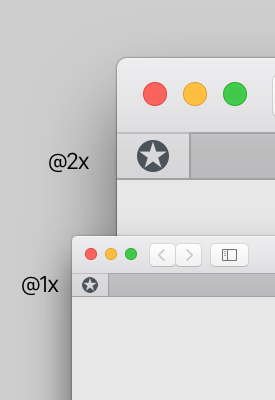
Tab Favicon
Safari can use an SVG and draw the shape with a specified color. It's recommended to use a simple icon that looks good as small sizes.
<link rel="mask-icon" href="/favicon.svg" color="#990000">
Apple: Touch Icons #
Last updated February 2021
An Apple Touch Icon is the icon that iOS uses when a user adds a website to their homescreen.
Sizes
- 120x120 - Retina iPhone Devices
- 180x180 - Retina iPhone Plus Devices
- 152x152 - Retina iPad Devices
- 167x167 - Retina iPad Pro Devices
Code
<link rel="apple-touch-icon" href="apple-touch-icon-120x120.png">
<link rel="apple-touch-icon" sizes="180x180" href="apple-touch-icon-180x180.png">
<link rel="apple-touch-icon" sizes="152x152" href="apple-touch-icon-152x152.png">
<link rel="apple-touch-icon" sizes="167x167" href="apple-touch-icon-167x167.png">